SAP S/4HANA AP automation
Procurement and AP automation, in sync with SAP S/4HANA
A single module live in as little as a week. The full source-to-pay suite in 8 to 16 weeks.
Raindrop Systems connects to every SAP S/4HANA edition, older ECC instances, and SAP Business One, and works alongside SAP Ariba where it’s already in place. SAP stays the system of record: Raindrop reads from it and writes back to it.
If invoice capture is all you need, SAP’s own AP features or an AP add-on may be the right call. If purchase requests, sourcing, and contracts still live outside SAP, a source-to-pay suite closes that gap on one platform.
Search for SAP AP automation and you’ll find three different answers: what SAP builds into S/4HANA and sells alongside it, a long list of AP add-ons, and full source-to-pay suites like Raindrop. Which S/4HANA edition you run changes the answer, and so does whether you’re still on ECC. This page lays out what each option covers, so you can pick the smallest thing that fixes your problem.
Three Ways to Automate AP on SAP
SAP's own AP features
S/4HANA checks invoices against the purchase order and goods receipt and blocks exceptions for payment, and SAP documents flexible approval workflow for Cloud Public Edition. For invoice capture, SAP sells SAP Ariba Invoicing and resells OpenText’s invoice add-on.
Best when AP is the whole problem and your purchase orders already live in SAP.
An AP add-on
Stampli, Tipalti, Basware, Esker, and Medius each publish SAP integrations, with different S/4HANA editions covered, different ways of connecting, and different pricing models.
Best when you want stronger capture, approvals, or payments without changing how you buy.
A source-to-pay suite
Raindrop covers intake, sourcing, contracts, purchasing, AP automation, and payments on one platform connected to any S/4HANA edition, ECC, or Business One, and works alongside SAP Ariba where it’s already in place.
Best when late invoices start upstream: requests outside any system, contracts nobody can find at invoice time.
What SAP S/4HANA Already Does for AP
Start here, because it may be enough. Checking invoices against purchase orders and goods receipts is standard SAP, in ECC and S/4HANA alike. Here’s how SAP documents it for S/4HANA Cloud Public Edition: the supplier invoice apps create invoices with or without a purchase order, and SAP compares each line with the purchase order and, where goods-receipt-based verification is set up, with the goods receipt. An invoice outside your tolerances still posts, but it’s blocked for payment, and an approval process starts when SAP can determine who’s responsible. Flexible workflow adds one-step or multi-step approval, set up by a configuration expert. The payment program then pays open items by the parameters you choose.
Invoice capture is where SAP points you to another product. SAP Ariba Invoicing, formerly Central Invoice Management, reads invoices from email, scans, PDFs, Peppol, and SAP Business Network with built-in AI OCR, and routes approvals in series, in parallel, or across levels. It’s sold separately, priced on request in blocks of 1,000 documents a year, and works with S/4HANA Cloud Public and Private Edition, S/4HANA 2022 SP1 or later, and ECC on enhancement package 8 or later.
SAP is adding AI here too. In S/4HANA Cloud Public Edition, Joule answers questions about supplier invoices and can release an invoice from a payment block. SAP also began a phased rollout of an Accounts Payable Assistant in the third quarter of 2026. SAP’s 2025 release notes put its AI agents in the Private Edition, while on-premise S/4HANA 2025 gets core functional enhancements.
SAP also resells SAP Invoice Management by OpenText, an add-on to ECC and S/4HANA that automates incoming invoices, with support through OpenText. In S/4HANA Cloud Public Edition, SAP now limits that option to customers who already license it. Still on ECC? For enhancement packages 6 to 8, SAP’s mainstream maintenance runs to December 31, 2027, and optional extended maintenance runs to December 31, 2030 at extra cost. SAP describes extended maintenance as a bridge for customers who can’t finish the move to S/4HANA in time.
Which SAP, in SAP’s words
S/4HANA Cloud Public Edition
A highly standardized public cloud ERP. Native AP: supplier invoice apps, flexible workflow, and Joule.
S/4HANA Cloud Private Edition
Private cloud based on standardized processes, with the extensibility of on-premise S/4HANA.
SAP ECC
SAP’s traditional on-premise ERP. Mainstream maintenance for enhancement packages 6 to 8 ends December 31, 2027.
AP Automation Options for SAP, Side by Side
What each option says about itself: the SAP products it names, how it connects, and what pricing it publishes. Edition coverage varies, so confirm yours in a demo.
| Option | SAP products named | How it connects | Published pricing |
|---|---|---|---|
| S/4HANA (built in) | S/4HANA | Invoice checks against the PO and goods receipt, payment blocks, payment run; flexible approval workflow documented for Cloud Public Edition | Part of S/4HANA |
| SAP Ariba Invoicing | S/4HANA Cloud Public and Private Edition, S/4HANA 2022 SP1 or later, ECC (EhP 8 or later) | SAP-built; AI OCR capture, approvals in the Ariba launchpad or S/4HANA’s Task Center | On request; blocks of 1,000 documents a year |
| SAP Invoice Management by OpenText | SAP ERP 6.0 and S/4HANA (Public Edition: existing licensees only) | Add-on resold by SAP; documentation and support through OpenText | None on SAP’s pages |
| Stampli | S/4HANA on-premise and private cloud, including RISE; ECC listed separately | SAP transport components plus a Bridge Connector or HTTPS connection | By quote |
| Tipalti | S/4HANA, Business One | S/4HANA: syncs suppliers, POs, goods receipts, bills, payments, and vendor credits. Business One: API | AP plans from $99/month plus transaction fees |
| Basware | SAP Cloud ERP (formerly S/4HANA), Private Edition connector | SAP BTP connector; SAP Clean Core certification for the Private Edition connector, in Basware’s words | By quote |
| Esker | ECC; S/4HANA on-premise, Private, and Public Edition | Pre-built connectivity; certified integration with S/4HANA Cloud, in Esker’s words | None published |
| Medius | S/4HANA, including RISE private edition | Pre-packaged connector; SAP-certified for RISE private edition add-on deployment (2023), in Medius’s words | By quote |
| Raindrop Systems | S/4HANA (Public, Private, and on-premise), ECC, and Business One, alongside SAP Ariba | RainConnect, which supports two-way sync for approvals, invoice status, and supplier updates across the platform; confirm your SAP fields in a demo. SAP stays system of record | Not published; request a demo |
S/4HANA (built in)
SAP products named: S/4HANA
How it connects: Invoice checks against the PO and goods receipt, payment blocks, payment run; flexible approval workflow documented for Cloud Public Edition
Published pricing: Part of S/4HANA
SAP Ariba Invoicing
SAP products named: S/4HANA Cloud Public and Private Edition, S/4HANA 2022 SP1 or later, ECC (EhP 8 or later)
How it connects: SAP-built; AI OCR capture, approvals in the Ariba launchpad or S/4HANA’s Task Center
Published pricing: On request; blocks of 1,000 documents a year
SAP Invoice Management by OpenText
SAP products named: SAP ERP 6.0 and S/4HANA (Public Edition: existing licensees only)
How it connects: Add-on resold by SAP; documentation and support through OpenText
Published pricing: None on SAP’s pages
Stampli
SAP products named: S/4HANA on-premise and private cloud, including RISE; ECC listed separately
How it connects: SAP transport components plus a Bridge Connector or HTTPS connection
Published pricing: By quote
Tipalti
SAP products named: S/4HANA, Business One
How it connects: S/4HANA: syncs suppliers, POs, goods receipts, bills, payments, and vendor credits. Business One: API
Published pricing: AP plans from $99/month plus transaction fees
Basware
SAP products named: SAP Cloud ERP (formerly S/4HANA), Private Edition connector
How it connects: SAP BTP connector; SAP Clean Core certification for the Private Edition connector, in Basware’s words
Published pricing: By quote
Esker
SAP products named: ECC; S/4HANA on-premise, Private, and Public Edition
How it connects: Pre-built connectivity; certified integration with S/4HANA Cloud, in Esker’s words
Published pricing: None published
Medius
SAP products named: S/4HANA, including RISE private edition
How it connects: Pre-packaged connector; SAP-certified for RISE private edition add-on deployment (2023), in Medius’s words
Published pricing: By quote
Raindrop Systems
SAP products named: S/4HANA (Public, Private, and on-premise), ECC, and Business One, alongside SAP Ariba
How it connects: RainConnect, which supports two-way sync for approvals, invoice status, and supplier updates across the platform; confirm your SAP fields in a demo. SAP stays system of record
Published pricing: Not published; request a demo
SAP’s details come from SAP’s own pages, and each vendor’s from its own. Certification and edition claims are each vendor’s wording, so confirm coverage for your edition and who supports the connection.
How Raindrop Connects to SAP S/4HANA and SAP Ariba
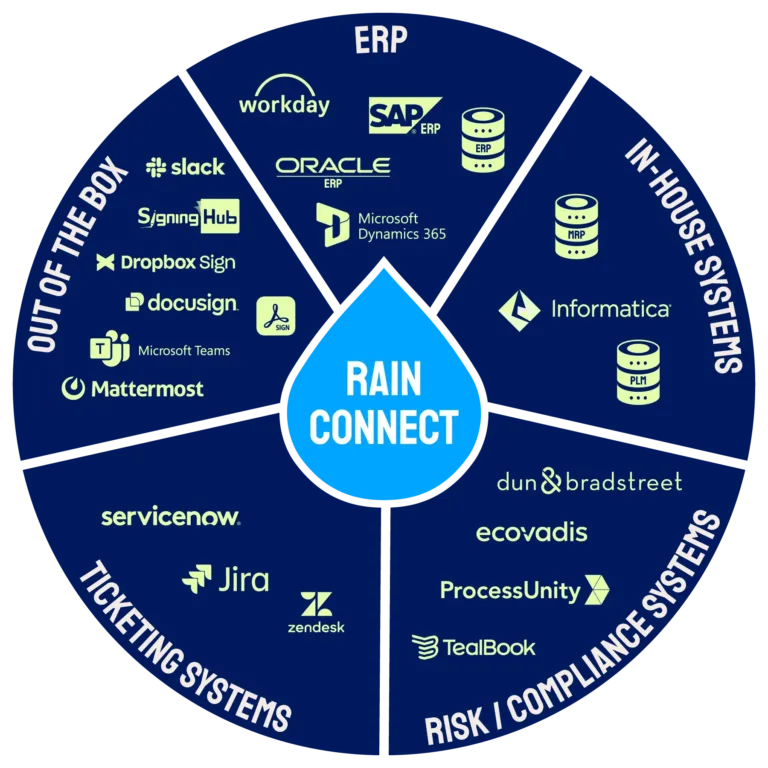
Raindrop’s integration layer, RainConnect, is built into the core platform from day one rather than bolted on afterward.
On SAP, Raindrop’s connections reach every S/4HANA edition, older ECC instances, and SAP Business One. Across the platform, RainConnect supports two-way sync for approvals, invoice status, and supplier updates, in real time where a workflow needs it and on a schedule where it doesn’t, chosen per workflow. SAP stays the system of record; Raindrop reads from it and writes back to it. Tell us which SAP system you run when you book a session, and we’ll confirm which fields sync with your setup.
Already on SAP Ariba? You don’t have to rip it out. Raindrop connects alongside Ariba where it’s already in place and reaches S/4HANA too, so teams can keep what works in Ariba and add intake, contracts, or AP automation around it. If you’re weighing Ariba itself, see how Raindrop compares.
Buckman Chemical runs SAP supplier onboarding through RainConnect, with supplier activation and deactivation synced both ways. Raindrop reports new-supplier setup down from 5 to 8 days to 4 to 8 hours.
Underneath, RainConnect runs on Workato, an enterprise-grade integration platform. SAP S/4HANA and SAP Ariba sit alongside NetSuite, Oracle, Sage, Microsoft Dynamics 365, and Workday on Raindrop’s list of maintained connections.
Full integration details, including architecture and connector list.
What RainConnect keeps in sync
Both directions, in real time or on a schedule, set per workflow.
- ◆Approvals
- ◆Invoice status
- ◆Supplier updates and deactivations
SAP stays the system of record. We’ll confirm the fields for your SAP setup in a demo.
How fast Raindrop goes live on SAP
1 week
Fastest go-live for a single module
AP automation on its own, in as little as a week.
8 to 16 weeks
The full source-to-pay suite
End to end, Raindrop’s own stated range.
Built in
RainConnect is part of the core platform
Built in from day one rather than bolted on.
SAP stays the system of record the whole way through. There’s no rip-and-replace ERP project.
What AP Automation for SAP Looks Like on Raindrop
Every invoice runs the same loop, whether it starts with a purchase request or lands cold in an inbox.

Intake and capture
A purchase request comes in through Raindrop, gets routed and approved, and becomes a purchase order. Or an invoice arrives with no PO behind it: a utility bill, a subscription renewal, a one-off vendor charge. Either path feeds the same AP process.
Raindrop’s AI reads whatever format the invoice arrives in, whether that’s a PDF, a portal upload, an EDI feed, or a photo of a paper receipt. There’s no OCR template to configure.
Matching and fraud checks
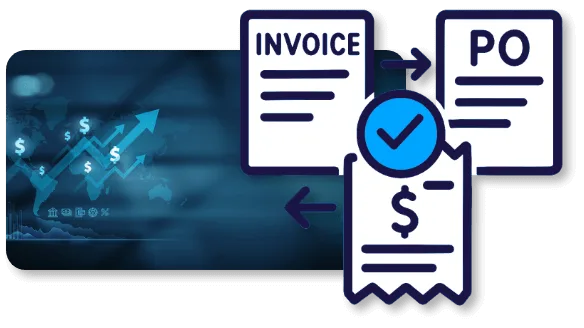
For PO-backed invoices, automated 2-way and 3-way matching reconciles the invoice against the PO and the receipt without someone cross-referencing systems by hand. For non-PO invoices, machine learning auto-codes them using historical patterns and your GL rules.
Before anything gets approved for payment, Raindrop flags duplicate invoice numbers, suspicious payment patterns, and mismatched supplier data. That check happens before the money moves.

Approval routing and payment
Invoices route through your approval rules. Once approved, payment runs through RainPay, and Raindrop writes the result back to SAP so the ledger matches what actually happened.
Raindrop’s AP Automation module documents this in more depth, including how a JD Edwards-based global manufacturer (Cordis) used it to cut AP cycle time by 76% (about 30 business days down to about 7) and reach 56% touchless processing across three regions. See the AP Automation module for the full picture.
Native, Add-On, or Suite? The Honest Answer for SAP Shops
When an AP-only tool is enough
If your SAP AP problem is genuinely just AP (invoices are slow, matching is manual, approvals chase people over email), start with what SAP includes, then a purpose-built AP add-on if you need more on capture, approvals, or payments. Adding a suite is more than that problem needs.
When a suite pays off
The calculation changes when AP is one symptom of a bigger pattern: purchase requests living in email and spreadsheets, sourcing decisions made without contract terms in view, supplier data duplicated across tools that don’t talk to each other. An AP tool fixes the loudest problem and leaves the rest in place. Raindrop covers intake and orchestration, sourcing, contract lifecycle management, procurement, AP automation, RainPay, and e-invoicing on one platform connected to SAP.
Here’s the honest trade-off. A suite is a bigger decision and a slightly bigger first scope than turning on a module. What it buys you is one integration to maintain, one data model instead of copies drifting apart, and a platform that can take on procurement or contract work later without a second vendor evaluation.
Built for the Four Rooms That Have to Agree
An SAP AP automation decision rarely gets made by one person. Here’s what each side of the table checks.

Controller / CFO
You need the numbers in SAP to be right as well as fast. Raindrop reads from SAP and writes back to it, so close isn’t waiting on a reconciliation between two systems. Fraud checks run before payment. Still on ECC? Put the AP cutover in the S/4HANA plan now: SAP advises customers who need extended maintenance to complete the order by the third quarter of 2027.
CPO / Procurement Operations Manager
Paying invoices faster is only part of the job. Requests, approvals, and supplier data often live outside SAP entirely. Raindrop puts intake, sourcing, and supplier data on the same platform as AP, so a purchase decision and the invoice it produces stay connected. If Ariba already runs your sourcing, Raindrop works alongside it.
CIO / CTO
RainConnect is a native part of Raindrop, running on Workato, with role-based access controls, secure API communication, and full audit trails. The platform runs on Google Cloud infrastructure. SAP stays the system of record. Raindrop connects to Public, Private, and on-premise S/4HANA alike; ask any other vendor which edition its connector supports, because SAP’s Public Edition is standardized and its Private Edition keeps on-premise extensibility.
Legal / Compliance
Every action, from invoice approval to payment release, leaves an audit trail. Fraud detection runs before payment, which matters for your control environment.
Why Analysts and Buyers Rate Raindrop
Raindrop is named a Sample Vendor in the 2026 Gartner Hype Cycle for Procurement and Sourcing Solutions, and has been recognized in Gartner Hype Cycles for five consecutive years. See the recognition.
On Gartner Peer Insights, Raindrop is rated 4.3 out of 5 from 23 ratings in the Source-to-Pay Suites market. Read the reviews on Gartner Peer Insights.
Both reflect the platform buyers evaluate regardless of which ERP sits underneath it. For an SAP shop building a shortlist, that’s third-party evidence next to whatever an AP-only vendor can show you.


The Hackett Group, 2026 Customer Value: AP Automation/Invoice-to-Pay and Source-to-Pay
Frequently Asked Questions
Partly. S/4HANA checks supplier invoices against the purchase order and goods receipt, blocks invoices outside tolerance for payment, and pays through the payment run, and SAP documents flexible approval workflow for S/4HANA Cloud Public Edition. For invoice capture, SAP sells SAP Ariba Invoicing, formerly Central Invoice Management, separately, priced on request.
For now. For ECC on enhancement packages 6 to 8, SAP's mainstream maintenance ends December 31, 2027, and optional extended maintenance runs to December 31, 2030 under a separate contract at extra cost. Older enhancement packages left mainstream maintenance at the end of 2025. For large systems, SAP also sells a time-bound transition option that SAP says can now run to 2035, with prerequisites. SAP's stated destination is S/4HANA.
Yes. Raindrop Systems connects alongside SAP Ariba where it's already in place and reaches S/4HANA too, so you can keep Ariba for what works and add intake, contracts, or AP automation around it.
Stampli, Tipalti, Basware, Esker, and Medius all publish S/4HANA integrations, and their edition coverage differs. Esker names Public and Private Edition and on-premise, Basware's certified connector is for the Private Edition, and Stampli supports on-premise and private cloud. Check each vendor's own documentation for your edition.
Through RainConnect, Raindrop's built-in integration layer running on Workato. Raindrop's connections reach both S/4HANA and older ECC instances. Across the platform, RainConnect supports two-way sync for approvals, invoice status, and supplier updates, and SAP stays the system of record. Tell us which S/4HANA edition you run and we'll confirm which fields sync with your setup.
A single module, including AP automation, can go live in as little as one week. The full source-to-pay suite typically takes 8 to 16 weeks.
Yes. Machine learning auto-codes non-PO invoices, such as subscriptions, services, and one-off purchases, using historical coding patterns and your GL rules instead of routing them to someone's inbox to guess at.
Raindrop fits organizations where SAP is the financial system of record and procurement, sourcing, or supplier management still run outside it, including teams that want to keep SAP Ariba. If AP is the only problem, SAP's own AP features or an AP add-on may be enough, and that's a fine answer.
See How Raindrop Connects to Your SAP Setup
The fastest way to evaluate this is against your own SAP landscape. Request a session and we’ll walk through how AP automation and procurement connect to it.
Keep reading
- ◆Raindrop Integrates Anywhere: the RainConnect architecture and the full ERP connector list.
- ◆SAP Ariba Alternatives and Competitors: the procurement suites SAP shops compare, and when to keep Ariba.
- ◆AP Automation and Procurement for NetSuite: the same approach for NetSuite shops.
- ◆AP Automation for Microsoft Dynamics 365 and Great Plains: the same approach for Dynamics shops.
- ◆AP Automation and Procurement for Sage: the same approach for Sage shops.